

| Getting your Trinity Audio player ready... |
Hi friend. Busy doing holiday shopping? Count your open browser tabs. Go on, I’ll wait.
If you’re like a lot of people this week, a few of them are the same pair of boots from three different stores. One is a tablet you looked at ‘on preview’ last Tuesday and can’t find again. There’s a cart you forgot about, a discount code you copied somewhere, and an email that said “ends tonight” that has vanished from your inbox.
Black Friday used to be one day. Now it’s weeks of sales, with every store running its own deals and every deal ending by midnight. It’s easy to shop all week and still not know what you’ve bought, what you’ve only looked at, and what you meant to come back to.
That isn’t a willpower problem. Your shopping is living in twelve places at once.
As a professional organizer in Houston, I’d fix it the way I’d fix a closet: one place for everything, and a quick way to clear it every day. It takes about 20 minutes to set up, and it works whether you’re buying for three people or thirty.
Step One: Make One Home for Everything You See
Pick a note app on your phone, a spreadsheet, or a page in a physical notebook, whichever you’ll actually open. Every idea goes there the moment you see it: who it’s for, what it is, the store, and when it’s on sale. Not in a screenshot, not in a tab, and not in your head.
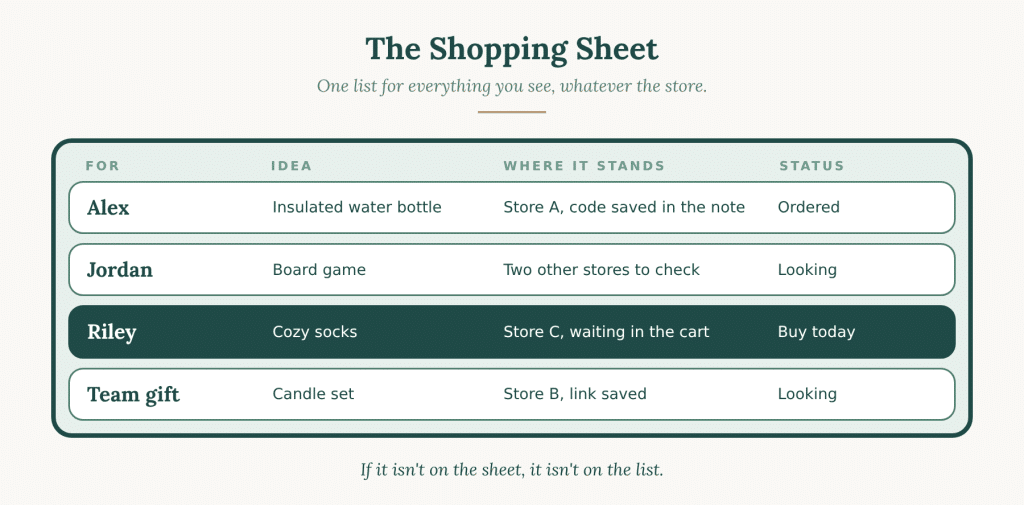
If you haven’t written your gift list yet, start there. I walked through it in how to organize holiday gifts during Black Friday sales.
Step Two: Let the Tabs Go
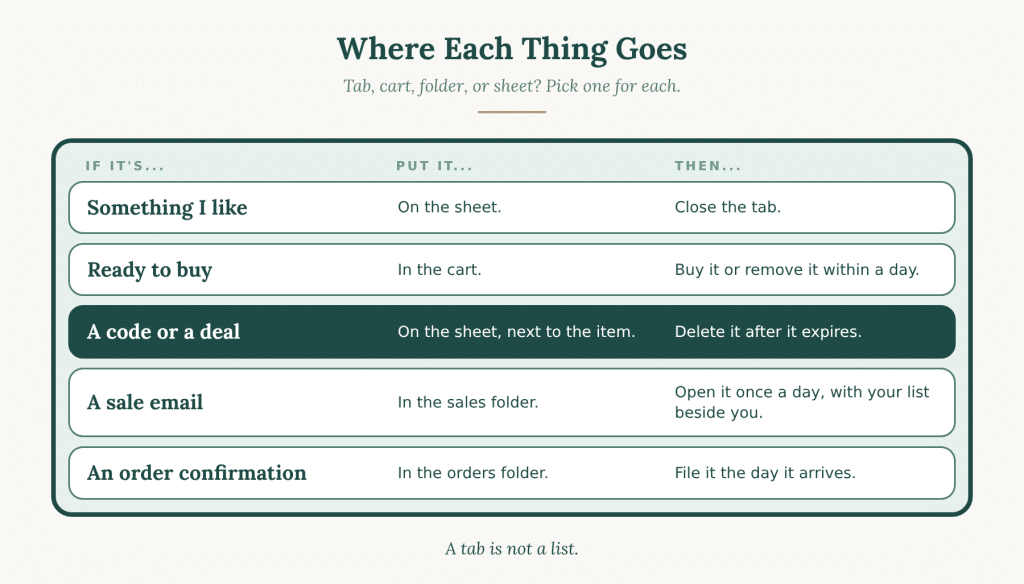
A tab isn’t a list. Once something is on your sheet, close the tab.
If you want to keep a few for later, drag them into one bookmark folder called “Gifts” and close the window. Then try a limit of five tabs at a time. It sounds strict, but a limit is what keeps you from reopening the same page fifteen times.
Step Three: Treat the Cart as a Waiting Room
Carts are handy, but they’re not a plan. Items sell out, prices change, and by the end of the week, you’ve got carts at six stores and no memory of what’s in them.
Use a cart for things you’re ready to buy, and buy them or take them out within a day. Everything else stays on the sheet. And when you do order something, mark it “ordered” right away.
Step Four: Give Sale Emails Their Own Room
Sale emails will take over your inbox if you let them. Make a folder or label called “Sales” and send the promotions there, so they don’t bury the messages you need.
Then open that folder once a day, at a set time, with your list next to you. That way you’re looking for what you planned to buy, not for what the sender wants you to buy. Order confirmations still go in their own folder, as I described in the gift post.
Step Five: Check Two Other Places, Then Decide
Price-hunting can swallow an afternoon, so give it a limit. Look at two other stores, pick the best option, and buy it. If the difference is small, take the one with the easier return policy and the shorter delivery time.
If you find a code, write it on the sheet next to the item. Codes are the first thing to go missing.
Step Six: Shop in Sessions, and End Each One With a Reset
Sales are built to feel urgent, and scrolling them in your spare minutes means you’ll never be finished. Instead, set aside one or two sessions a day, 30 minutes each, with a timer. Outside those, leave the sales alone.
When the timer goes off, spend ten minutes putting everything back where it belongs.
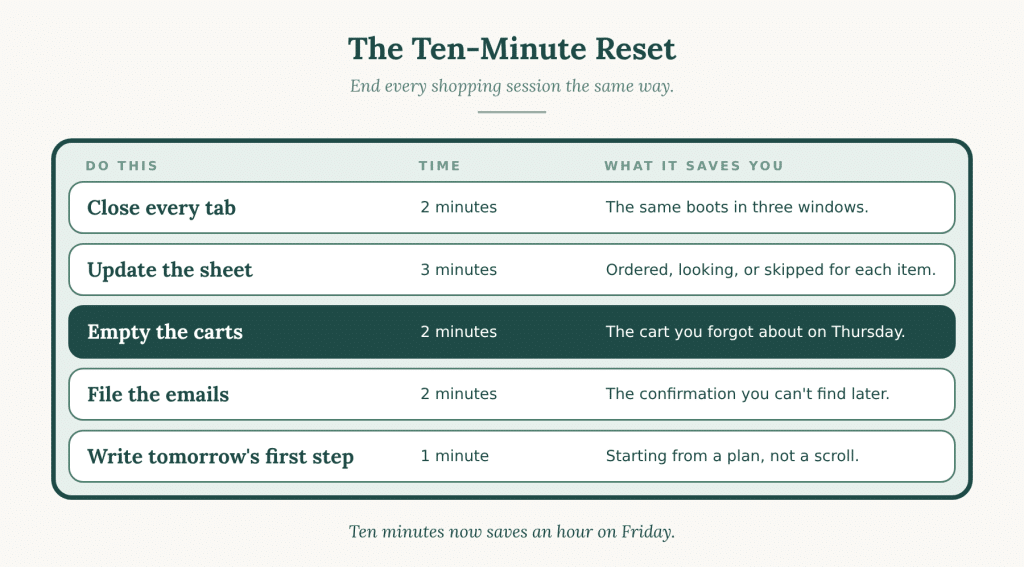
By the end of the week, every purchase is on the sheet, the carts are empty, and your inbox is no longer a pile of deadlines.
The Organization Shopping List
Look at what you have first, then buy only what fills a gap. Here’s what I’d look for:
- A notebook or printable planner, if paper works better for you
- A kitchen timer, for shopping sessions
- Sticky notes, for codes and reminders
- A small accordion file, for paper receipts and packing slips
- A lap desk or laptop stand, so shopping happens in one spot
After the Holidays
When the season ends, don’t delete the sheet. Save it. Next year, it tells you what you bought, what worked, and where you found it, so you’re not starting from nothing.
Then unsubscribe from the senders you never opened, delete the “Gifts” bookmarks, and empty the sales folder.
If your shopping is under control but the house isn’t, with boxes in the hall, closets full, and nowhere to put what’s coming, that’s a bigger job than a list. It usually means the whole house needs a reset, and that’s where I can help.
As a decluttering expert and professional organizer, I work with clients in person across the Greater Houston area and virtually from anywhere. My calendar fills quickly in the weeks before the holidays, so now is the time to ask.
Book a session now, or call 832-271-7608 and we’ll find a time before the next box arrives. If you have questions first, fill out the form below and tell me what you’re working with.

- How to Organize Holiday Shopping Across Stores and Sites - November 23, 2026
- Garage Organization Tips for Storing Summer Gear - September 14, 2026
- How to Declutter Your Closet: What to Keep, What to Let Go, and Why It’s Harder Than It Should Be - July 21, 2026