
| Getting your Trinity Audio player ready... |
Hey friend,
If you work from home, your desk has probably turned into more than a place to sit and type. It’s a charging station, a video call setup, and storage for every gadget that doesn’t have anywhere else to live.
When I organize a home office, the desk is usually buried in hardware: a laptop, a second monitor, a keyboard and mouse, a webcam, a hub, headphones, chargers for three different devices, and an unruly nest of cables connecting all of it.
This all needs a different fix than most desk organizing advice offers, and it needs to fit how you work, not just look tidy. Here’s how to do both.
Step One: Clear Out What Doesn’t Belong There
Before you organize anything, pull everything off the desk and sort it honestly. A lot of what’s crowding a desk isn’t in use at all.
Old phone chargers for a phone you no longer own. A mouse you replaced but kept “just in case.” Cables with no idea what they connect to anymore. Promotional freebies from a conference three years ago. A second keyboard because the first one’s batteries died and you never dealt with it.
If you can’t name what it’s for right now, it doesn’t go back on the desk. This step alone usually clears more space than any organizer you could buy.
Step Two: Set Up Around How You Really Work, Not How a Photo Looks
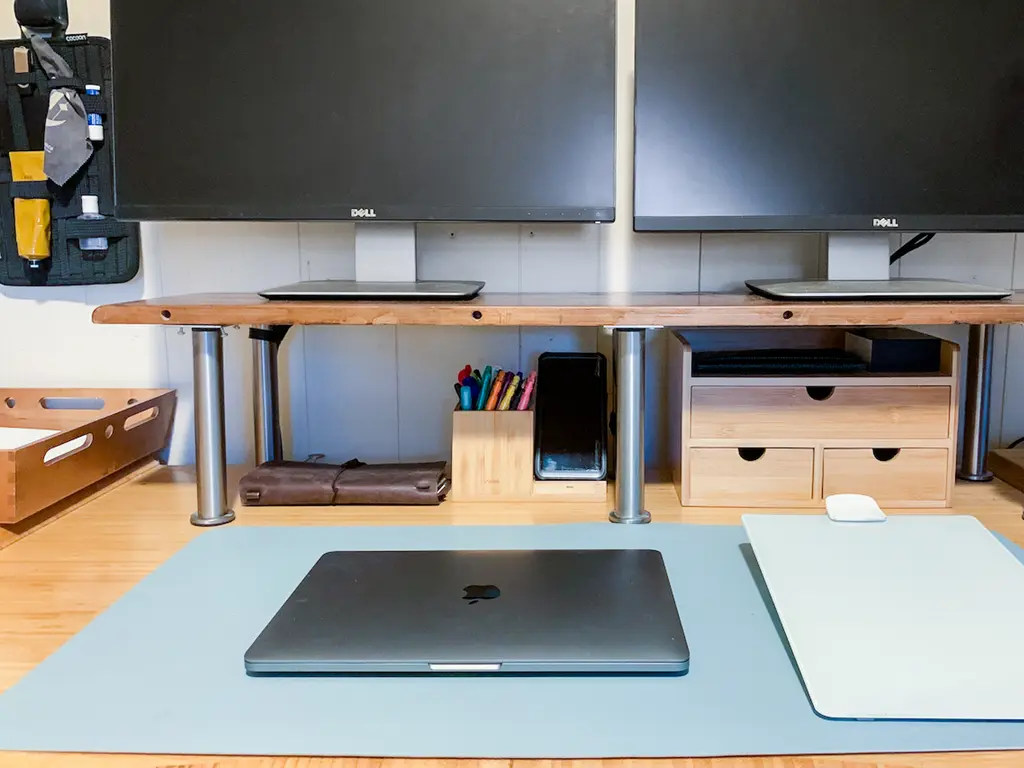
Once you’re down to what you really use, the setup has to match how you work, or it won’t last.
If you’re a visual person who needs to see something to remember it exists, don’t hide your most-used gear in a drawer. An open dock or a tray on the desk keeps your headphones, current notebook, or charging cable in sight, so you’re not fighting your own memory every day.
If you naturally pile things up while you work and sort later, give that pile one defined space — a tray or a shallow basket — instead of letting it spread across the whole surface. The goal isn’t zero piles. It’s one contained pile instead of five scattered ones.
If you think better with a clear desk and get distracted by anything extra in view, lean into hardware that disappears: a monitor arm instead of a stand, a keyboard tray that slides away, a hub tucked under the desk instead of sitting on top of it.
None of these is more “organized” than the others. The wrong setup is the one that fights how your brain really works, no matter how good it looks.
Step Three: Handle the Cables
Cables are usually the fastest thing to fix and the first thing to spiral back into chaos.
Every cord should have a route, not just an outlet. Use adhesive clips or a cable tray to run cords along the back or underside of the desk instead of letting them drape across the surface or tangle underfoot.
Bundle anything that travels together — a monitor cable, its power cord, and a hub cord — with a velcro strap so it moves as one unit instead of three you have to trace by hand every time something shifts.
Step Four: Give Chargers a Single Home
If you’re constantly hunting for “the” charging cable, that’s the clearest sign this hasn’t been solved yet.
A small charging dock, a drawer with dividers, or a labeled basket all work, as long as every charger returns to the same spot instead of living wherever it was last unplugged. Pick one system and hold everyone in the house to it, including yourself on a rushed morning.
Step Five: Get Hardware Off the Desk Surface
A lot of what looks like clutter is really just hardware sitting where it doesn’t need to.
A monitor arm frees up the real estate a monitor stand takes up. A keyboard tray or slide-out drawer gets your keyboard and mouse out of the way when you’re not typing. A vertical stand for a laptop or tablet takes up a fraction of the footprint of laying it flat.
None of these require a full desk overhaul. Most clip or mount onto the setup you already have.
Step Six: Group by Function
Everything related to video calls — webcam, ring light, headphones — lives in one spot. Everything related to backup and storage — an external drive, flash drives, an old phone you’re keeping as a backup device — lives in another.
The goal is that you never have to think about where something belongs. If you’re pausing to decide, the grouping isn’t working yet.
Step Seven: Leave Room to Grow
Hardware changes faster than almost anything else on a desk. A new device, a new cable, a new peripheral shows up more often than you’d expect, and a system that’s maxed out the day you build it will be a mess again within a month.
Leave a little slack — an extra outlet on the power strip, an empty slot in the charger dock, space in the cable tray for one more cord.
Keep the Weekly Reset Short
A desk that gets used all week will always drift, no matter how well it’s set up. The goal isn’t preventing that. It’s having a fast way to bring it back under control.
Once a week, put loose cables back in their route, return anything that’s wandered off, and clear whatever landed on the surface that doesn’t belong there. Five minutes on a schedule beats an hour of frustration once it’s completely buried again.
If your home office or desk setup has turned into the spot you avoid looking at too hard, that’s exactly the kind of project I help clients tackle — building a system around the hardware you use and the way you really work, not around what a photo says a desk should look like.
As a decluttering expert and professional organizer I work with clients in person across the Greater Houston area and virtually from anywhere. Book a session here, call 832-271-7608 to get started even faster, or, if you still have questions, complete the form below. I’ll answer them as quickly and completely as possible.

Working with Taya and her team is easy. You can book an appointment easily on her website, or contact her directly at 832-271-7608
- How to Set Up Your Guest Room Before Holiday Guests Arrive - October 19, 2026
- How to Organize Your Hall Closet Before Holiday Guests Arrive - October 16, 2026
- Professional Organizer or Cleaning Service? How to Know Which One Your Houston Home Needs - October 14, 2026